

This Tradetron review has been updated with the latest platform features, pricing approach, broker integrations, and key pros/cons for 2026.
What’s New in This Tradetron Review (2026 Update)
This article was originally published in 2021, but Tradetron as a platform has evolved significantly since then. To keep this review accurate and useful, I’ve updated it for 2026 with the latest insights.
- Updated for 2026: This review now follows a modern “quick verdict + pros/cons + pricing + alternatives” structure preferred by readers and Google search results.
- Fresh analysis: Added realistic expectations around slippage, deployment delays, marketplace performance and backtest limitations.
- More practical guidance: Included who should use Tradetron, who should avoid it, and the best-use cases for beginners vs intermediate traders.
- Added alternatives: Included updated Tradetron alternatives (Streak, AlgoTest, Quantman, and custom Python setups).
- New FAQs: Added FAQs to improve clarity and search visibility.
If you are considering Tradetron today, please treat this as a 2026 review rather than the older 2021 version.
TradeTron is an algo trading marketplace that helps you create & automate your strategies, backtest them and also sell them to traders and investors all over the world. While most platforms I have invested in are investment based like Altdrx and Grip Invest ; this is a cloud-based algorithmic trading platform
Tradetron Introduction
TradeTron is cloud-native which means you do not need to install any software to do any of the above things. All you need is an internet connection and a browser to access Tradetron. Your strategy conditions are checked by the distributed computing devices in the cloud and executed within a blink of an eye.
- Create and Backtest your strategy
- Fully automate your strategy rules
- Subscribe to others’ strategies from their marketplace
- Sell your strategy as a subscription

Quick Verdict: Is Tradetron worth it in 2026?
Tradetron is best for: Beginners and intermediate traders who want to deploy rule-based strategies without coding.
Not ideal for: Traders who expect “plug-and-play profits”, need low-latency execution, or want full Python-level quant control.
My rating (2026): ⭐ 4.1/5 (Great tool, but marketplace strategies require caution)
- Best for: No-code algo trading + options strategy automation
- Main risk: Live execution mismatch vs backtests (slippage, delays, broker API)
- Recommendation: Start small, track 30–60 days of live performance before scaling
Why Do Most Trader fail?
Did it not ever come to your mind that if you are always losing money what if you took exactly opposite decision of what you want to trade, will you make money?!!

Well you will still lose money. Not because you are bad at picking trades but because you let emotions take over.

Tradetron has created an ecosystem where you can create automated strategies and seamlessly connect to any broker. You can also replicate any top performing strategy
ECOSYSTEM FOR ALGO TRADERS
Lets think in terms of who all contributes to entire ecosystem for algo:
- Brokers
- Strategy Creators
- Investors
1) Brokers
Tradetron already has all the big online brokers starting from Zerodha, Upstox ,etc. You can find most of the brokers . It can connect to any broker as it is built on open architecture .
2) Strategy Developers
As strategy developer the best part is that you don’t need to learn complicated coding language and that’s the biggest USP for tradetron. You can actually fire orders in options based on technical parameters like RSI, Bollinger Bands etc. Once you have robust strategies you can put up in marketplace for traders to subscribe. Also manage the billing cycle of traders.
3) Investors
Traders are always in hunt for new strategies and tradetron marketplace helps you to do exactly the same. It helps you find strategies based on criteria like exchanges, instruments, style of algo and capital required. You can subscribe to the strategies and paper trade for a while before you can go live. This also helps you build confidence in the strategy.
Features of Tradetron
Below are some noteworthy features of Tradetron which makes it a great automated trading platform:
Simple Strategy Builder
You can configure any strategy in Tradetron without writing a single line of code. A strategy can be organized into multiple sets, with each set having its own entry/exit conditions. Moreover, the strategy rules can be applied to a single instrument, a basket of instruments (like Nifty 50), or a custom watchlist

Effortless Backtesting
Once you configure your strategy conditions in Tradetron, it can be backtested by clicking a button from the strategy page itself.
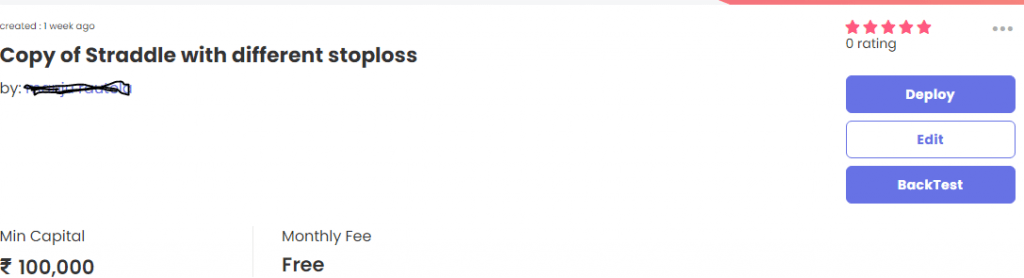
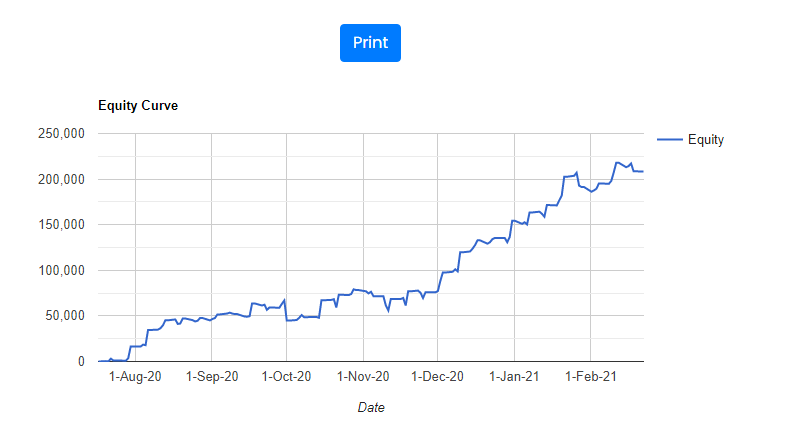
You get a detailed report of what the strategy was doing on each day of the backtesting period. Hence the report can be used to evaluate your strategy.
Copy Top Traders on Tradetron
You can just click on subscribe and copy top traders. Then you can check their historical performance. You can also paper trade their strategies till you are confident
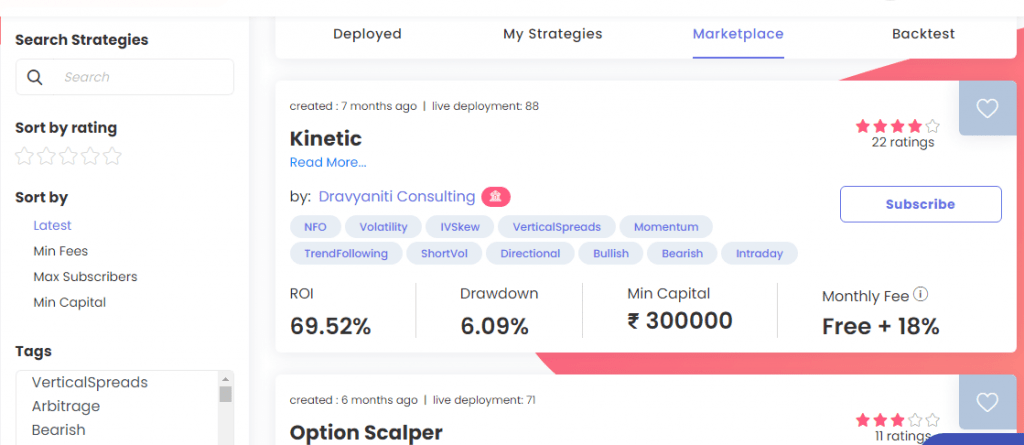
You can check the statistics of performance also
How to Get Started with Tradetron?
Step 1: Create a new Tradetron Account
Follow this link and click on the “Sign Up” button on the top right. Enter your primary details to register. You also have an option to Sign in through Facebook or Google account.

Step 2: Purchase a subscription plan (optional for paper trading)
Once you are logged in, click on your user name on the top right and then click on “Subscriptions”. On the next page click on the “change plan” option. Chose a plan as per your requirements and complete the payment. We would recommend starting with the Retail plan and select the yearly option to save up to 20-30% on the overall amount.
Step 3: Add a broker (optional for paper trading)
Click on your user name on the top right and then click on “Brokers and Exchanges”. On the next page click on the “Add Broker” option. Add the broker details appropriately and click on the “Save” button.

Step 4a: Create a Strategy (If you want to automate your own strategy rules)
Now comes the interesting part. You can create your strategy in Tradetron by selecting Strategies –> Create from the top menu bar after logging in.
You’ll need to enter the basic strategy details and its entry-exit condition


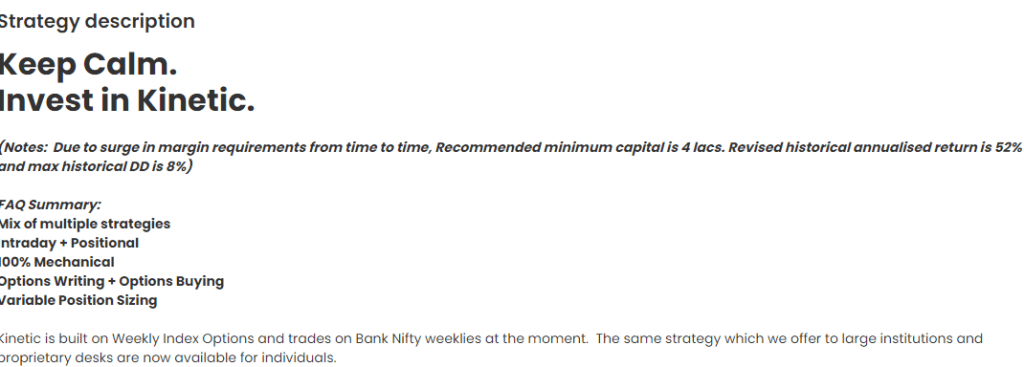
Step 4b: Copy a strategy from marketplace
You can backtest and papertrade the strategy before committing real money
Step 5: Deploy a Strategy
Deploying a strategy means activating it for live trading. To deploy, you’ll need to provide the below details on the deployment page:
- Multiplier – Denotes your position size. Default is 1x which means the minimum position size specified by the strategy creator is used.
- Execution Type – You have 4 options here – Live Auto, Live Auto – One Click, Live Offline, Paper Trading. See descriptions of these options on the “Execution Types” subheading in this article.
- Broker – All your added brokers will show up in the dropdown. Select the one that you want to use for this strategy. For paper trading, the broker is defaulted to “TT Paper Trading”.

Once the strategy is successfully deployed, you are good to go. Verify if the trades are correctly executed during market hours. You will get notifications for all the trades.
Tradetron Pricing (2026)
Tradetron pricing depends on the plan you choose and how many strategies you want to run. In most cases, users end up paying for two things:
- Tradetron platform subscription (to build and deploy strategies)
- Marketplace subscriptions (monthly fee for strategies created by other traders)
Important: Tradetron can feel inexpensive at the start, but your total cost increases if you subscribe to multiple marketplace strategies.
My suggestion: Subscribe to only one strategy initially, run it with small capital for 30–60 trading days, and scale only if live results match your expectations.
Tradetron subscription is offered at a nominal price for the features it offers. It starts at 1000 INR per month for the Retail plan and goes up to 15000 INR per month for the institutional plan. For the US market, it ranges from $50 to $475 per month.

There is also a free plan (0 INR) that allows you to do paper trading and create 1 private strategy. We recommend starting with the Retail plan as it contains all the needed features to fully automate your strategy. Retail+ plan is also good if your strategy requires continuous condition checking. (For retail plan strategy conditions are checked every 1 minute).
There is an additional 18% GST that is levied on top of the listed price. credit card, net banking, or UPI can be used for payment.

There is no additional data cost or VPS cost involved on top of the subscription fee. However, if you want to subscribe to any of the existing strategies from the marketplace, it may attract some additional fees which you can find on the strategy page.
What makes Tradetron Different?
Certainly, there are several automated trading platforms out in the market. But how does Tradetron stand out among all of them?
- Tradetron is cloud-native, which means you do not need to install any software to operate it.
- Tradetron offers seamless connectivity to numerous brokers without writing any single piece of code.
- At Tradetron, you can create a strategy, backtest it, and also automate the execution. There is hardly any platform which offers all 3 features,
- Tradetron allows you to subscribe to others’ strategies through a marketplace, it’s like a win-win situation for both strategy creators and subscribers.
- You can trade in Indian as well as US markets through one platform. Furthermore, you can trade on multiple instruments, currencies, and exchanges. The list is growing every day!
Tradetron Pros and Cons (My Honest Review)
✅ Pros
- No coding required: Perfect for beginners who want automation without programming.
- Good for options trading: Supports multi-leg strategies like iron condors, spreads and hedged setups.
- Marketplace access: You can explore ready-made strategies and ideas quickly.
- Automation improves discipline: Reduces emotional decision-making and trading mistakes.
❌ Cons
- Backtest ≠ live performance: Slippage, execution delays and broker API issues can impact results.
- Marketplace strategy risk: Many users subscribe based on returns without understanding the logic.
- Limited advanced customization: Not ideal for deep quant research, tick-data models or Python automation.
- User error is common: Wrong deployment settings or insufficient margin can create losses and bad experience.
Who Should Use Tradetron?
Tradetron makes the most sense for:
- Beginners who want to start algo trading without coding
- Discretionary traders who already have rules and want discipline through automation
- Options sellers who want structured entries/exits and risk limits
Who Should Avoid Tradetron?
Tradetron may not be suitable if:
- You want professional quant infrastructure (Python + data pipelines + advanced analytics)
- You require very fast order execution / low-latency trading
- You expect guaranteed returns from marketplace strategies
Tradetron Marketplace Strategies: What Most People Get Wrong
Tradetron’s marketplace is one of its biggest advantages — but also the biggest reason why many traders lose money.
Common mistake: Traders subscribe based only on backtest returns and deploy with full capital immediately.
Reality: Live trading results may differ due to:
- slippage
- execution delay
- broker API downtime
- market regime change
- drawdowns not reflected properly in backtests
My rule: If you do not fully understand the strategy logic and risk, do not subscribe.
Best Tradetron Alternatives (2026)
- Streak: Great for Zerodha users who want simple rule-based automation.
- AlgoTest: Best for options strategy backtesting and research.
- Quantman: Useful for traders who want deeper deployment features and structured automation.
- Python + Broker API: Best for advanced traders who want full control and customization.
Conclusion
Algorithmic/automated trading has become critical for success in financial markets. Every retail trader has to adapt to this new way of trading sooner or later.Taking out emotions from a strategy is must for long term profitability. And platforms like TradeTron has made this easier and faster.
TradeTron contains everything that you require to start your algorithmic trading journey. Its patent-pending technology requires a minimum learning curve. However one needs to first backtest and paper trade before launching any strategy or copying a top trader from marketplace
FAQs
Is Tradetron safe?
Tradetron is a widely used algo trading platform and typically works through broker API integration. However, trading risk remains with the user, and losses are possible.
Is Tradetron good for beginners?
Yes. Tradetron is one of the easiest ways to start algo trading in India without coding. But beginners must start with small capital and understand drawdowns.
Can Tradetron marketplace strategies guarantee profit?
No. Strategy performance changes over time and may differ in live trading due to slippage and execution factors.
Which is better: Tradetron or Streak?
If you want marketplace and multi-leg options automation, Tradetron is better. If you want simplicity and tighter Zerodha integration, Streak is better.
